
Email and SMS
Trust codes your customers can check
Keep your email system and your SMS provider. Add a trust code to each message, and your customers can check it in the free ID-Truster app to see that it really came from you.
End-to-end verified with Ed25519 signatures
Email and SMS
Let your customers trust email and SMS again
Add a trust code to the emails and texts you already send. Your customer copies it into the free ID-Truster app and answers three quick questions about the message. If the answers match, the message really came from you. It takes a few seconds.
The code is created for one recipient only. It fails for anyone else, and an old code cannot be reused in a new message.
Integration and data
Your systems stay. Your data stays.
You keep your CRM, your email system, and your phone setup. ID-Truster is a layer on top, called from your own systems through our API. A ready-made Mailchimp integration exists today.
Trust codes are created and stored in your own ClientDB on your infrastructure. ID-Truster cannot see which or how many codes you create. The app checks your digital signature against a key in your own DNS, so a breach at ID-Truster alone cannot fake your messages.
How it works
How a trust code is checked
Trust codes are created, stored, and checked in your own systems. ID-Truster never holds them.
You create a code for each recipient
Right before an email or text message goes out, your system creates a trust code. For newsletters this happens automatically for every recipient. Each code is unique and locked to that recipient’s email address or phone number. You create, store, and check the codes in your own ClientDB, as many as you need.
Your customer checks it in the app
When the email or text message arrives, the first thing your customer does is copy the trust code into the free ID-Truster app and tap Check. Then they wait a few seconds for the answer.
ID-Truster passes it on
This is the first time ID-Truster sees the trust code. The format of the code tells us which company created it, and we notify your ClientDB to pick it up. ID-Truster works like a mailbox. We receive the code and pass it straight on to the right company. It stays with us only for the few seconds that takes.
Your system answers
Your ClientDB then checks that the code was created for this exact customer and answers yes or no. The answer can include when the message was sent.
ID-Truster sends your answer back
ID-Truster receives your answer and sends it straight back to your customer.
Your customer answers three questions
The answer is signed with an Ed25519 key, and the app checks the signature against the public key you publish in DNS on your own domain. To make sure nobody reuses an old trust code to pose as your company, the app then guides your customer through three questions about the message. What is the sender address? On what date did it arrive? At what time? Each question has four options, and only one is right. The guide helps your customer pay extra attention. If they answer wrong, the app tells them the message may not come from you.
The whole check takes a few seconds.
The format
How a trust code is built
Every company trust code follows the same pattern. The format tells ID-Truster which company created the code, so we can pass it straight on to your system.
i10dem05iw5gt9
5iw5gt9Unique code Created by your system for this one recipient.0Separator Marks where the unique code begins.demCompany ID Tells ID-Truster which company created the code.0Separator Marks where the company ID begins.1Version The version of the trust code format.iCompany marker Every trust code from a company starts with i.
Try it yourself
Try a trust code yourself
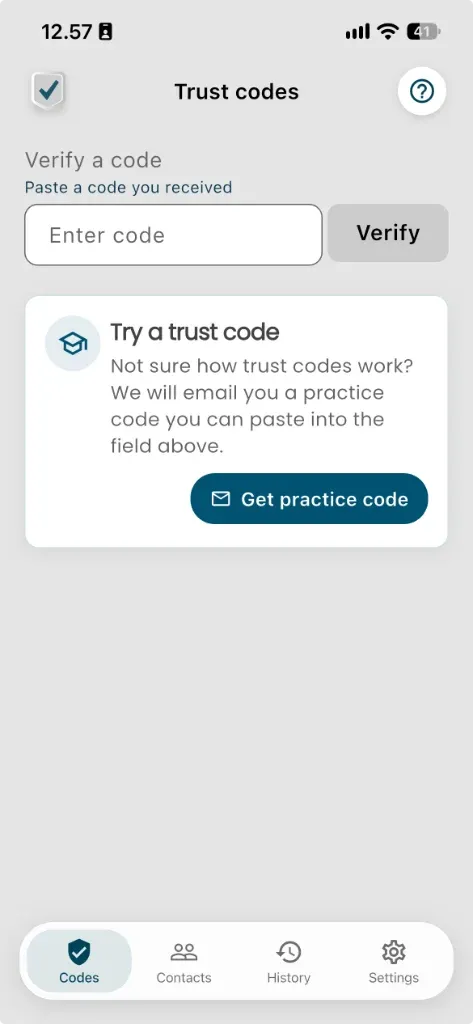
Download the free ID-Truster app and create a user. On the Trust codes screen, tap Get practice code.
We email you a trust code that only you can check. Paste it into the app, answer three quick questions, and see exactly what your customers will experience.


Questions about trust codes
What is a trust code?
A unique code you add to an email or text message, created for one recipient only. Your customer checks it in the free ID-Truster app to see that the message really came from you.
What happens if a customer forwards the code?
It will not work for anyone else. A trust code only works for the recipient it was created for.
Can an old trust code be reused in a new message?
No. If someone puts an old code into a new message, the time your customer received it does not match the original message, and the check fails.
Where are trust codes stored?
In your own ClientDB on your own infrastructure. ID-Truster cannot see which or how many codes you create.
Can someone fake or guess a trust code?
No. A trust code is just a random string, and it means nothing on its own. When your ClientDB is asked to check a code, it also receives the email address of the person checking it. Put simply, your database looks up whether there is a row where both the email address and the trust code match. A guessed or copied code has no matching row for anyone else, so the check fails.
Why does the app ask three questions?
Your ClientDB only answers yes or no to whether the code belongs to this customer. So someone could get hold of an old trust code your company sent to this customer, put it in a new email, and pose as you. That is why every trust code is tied to the sender address and the time the original message was sent. The three questions ask your customer about exactly that. A new email with an old trust code does not match, and the app rejects it. The questions also make your customer look closely at the message before trusting it.
Does it work with text messages too?
Yes. When you create a trust code, it is locked to either an email address or a phone number. Only the person who uses ID-Truster with that email address or phone number can check the code. For a text message, the app asks about the sender's phone number instead of the email address.
What if the customer doesn't have the app?
They get your email or text message as usual. They just can't check the trust code until they download the free ID-Truster app.
Can we use trust codes in newsletters?
Yes. Each recipient gets their own trust code, so every newsletter can be checked by the person it was sent to. A ready-made Mailchimp integration is available today.
Do we pay for codes that are never checked?
No. A credit is only used when your customer checks a trust code in the app.
How long is a trust code valid?
As long as you keep it. Trust codes are stored in your own ClientDB, and a code can be checked for as long as it's stored there. Your company decides how long to keep them, in line with your own data retention policy. When you delete a code, it can no longer be checked.
When should we not use a trust code?
When someone else writes the message. A trust code tells your customer that the whole message comes from your company. If your platform passes on messages from others, such as sellers, hosts, or other users, do not add a trust code to them. Otherwise a stranger's message can look as if you vouch for it. Only use trust codes on messages your company writes and stands behind.
What do we need to set up?
We are writing the documentation on how to use ID-Truster right now. All integration happens through API calls. We have built a Supabase installation called ClientDB. If you choose to use it, you are up and running almost right away. When you get started, you create the keys you need, including a public key in a TXT record in your DNS. Then you decide if you want to integrate ID-Truster with your CRM and mail system, again through our APIs.
We are looking for pilot customers for our business solution
ID-Truster connects to your CRM and newsletter system. When you call customers or partners, they get a message on their phone showing that the call comes from you. And with a trust code in your emails, recipients can easily verify that the sender really is your company.
Want to help shape the solution as a pilot customer or development partner?
Write to us.
info@idtruster.com